本文详细介绍如何基于 .NET 8 + Vue 3 + MongoDB + Qdrant 构建一套完整的 AI 内容处理流水线,实现从 RSS 源抓取到语义搜索的全链路自动化。
📋 目录
架构概览
系统架构图
┌─────────────────────────────────────────────────────────────────────────────┐
│                           RSS AI Pipeline                                    │
├─────────────────────────────────────────────────────────────────────────────┤
│                                                                              │
│  ┌──────────┐    ┌──────────┐    ┌──────────┐    ┌──────────────────────┐   │
│  │  RSS 源  │───▶│Gatekeeper│───▶│ DeepRead │───▶│  Data Enrichment    │   │
│  │  (多源)  │     │  (筛选)  │    │ (抓取)   │    │  (评分+向量化)      │   │
│  └──────────┘    └──────────┘    └──────────┘    └──────────────────────┘   │
│                        │              │                     │                │
│                        ▼              ▼                     ▼                │
│                  ┌──────────────────────────────────────────────┐            │
│                  │            MongoDB (FeedItem_YYYYMM)         │            │
│                  │   process_status: 0 → 10 → 20 → 100/-1/99    │            │
│                  └──────────────────────────────────────────────┘            │
│                                                                  │            │
│                                                                  ▼            │
│                                                          ┌──────────┐        │
│                                                          │  Qdrant  │        │
│                                                          │ (向量库) │        │
│                                                          └──────────┘        │
└─────────────────────────────────────────────────────────────────────────────┘
技术栈
| 层级 | 技术选型 | 说明 |
|---|---|---|
| 后端 | .NET 8 + ASP.NET Core | BackgroundService 驱动的异步流水线 |
| 前端 | Vue 3 + Vite | 管理后台和监控面板 |
| 数据库 | MongoDB | 按月分表存储 FeedItem |
| 向量库 | Qdrant | 高性能向量搜索引擎 |
| AI 评分 | Gemini / Qwen (Ollama) | 内容分析和评分 |
| AI 向量 | BGE-M3 (Ollama) | 中英文混合 Embedding |
| 浏览器自动化 | Playwright | 处理需要登录的站点 |
状态流转
ProcessStatus 状态机:

    ┌─────────────────────────────────────────────────────────┐
    │                                                         │
    ▼                                                         │
[0: PendingTriage] ──Gatekeeper──▶ [10: PendingDeepRead]     │
         │                                  │                 │
         │ (无规则/不匹配)                   │                 │
         ▼                                  ▼                 │
  [-1: Ignored]              [20: PendingAnalysis]           │
                                           │                  │
                              ┌────────────┴────────────┐     │
                              ▼                         ▼     │
                     [99: LowQuality]          [100: Done] ◀──┘
                     (评分<60/无正文)           (写入Qdrant)
流水线四阶段详解
阶段 1: Gatekeeper(守门员)
职责:基于白名单规则过滤低价值内容,只有明确匹配的内容才能进入下一阶段。
核心逻辑:
// 严格白名单模式:必须配置 Keywords 且命中才放行
if (rules.Keywords == null || rules.Keywords.Count == 0)
{
    item.ProcessStatus = FeedStatus.Ignored; // 无规则 = 拒绝
    return;
}

bool matchedKeyword = rules.Keywords.Any(k =>
    title.Contains(k, StringComparison.OrdinalIgnoreCase));

if (!matchedKeyword)
{
    item.ProcessStatus = FeedStatus.Ignored; // 不匹配 = 拒绝
    return;
}

// 检查黑名单和最小长度...
item.ProcessStatus = FeedStatus.PendingDeepRead; // 10
配置示例 (RssNode.ValidationRules):
{
    "Fetcher": "Playwright",
    "Keywords": ["AI", "深度学习", "GPT", "大模型"],
    "Blockwords": ["广告", "推广"],
    "MinTitleLength": 10
}
阶段 2: DeepRead(深度抓取)
职责:获取文章完整正文,支持多种抓取策略。
策略模式架构:
public interface IContentFetcher
{
    string StrategyName { get; }
    bool CanHandle(RssNode node);
    Task<string> FetchContentAsync(FeedItem item, RssNode node);
}

// 策略实现
- DefaultContentFetcher: HTTP + HtmlAgilityPack
- PlaywrightContentFetcher: 浏览器自动化(需登录站点)
智能正文提取(移除网页噪音):
// 移除导航、侧边栏、广告等
const noiseSelectors = [
    'nav', 'footer', 'header', 'aside',
    '.sidebar', '.ads', '.comment', '.share',
    '[class*="navigation"]', '[id*="footer"]'
];
noiseSelectors.forEach(sel => document.querySelectorAll(sel).forEach(e => e.remove()));

// 优先查找正文容器
const articleSelectors = ['article', 'main', '.article-content', '.post-body'];
for (const sel of articleSelectors) {
    const el = document.querySelector(sel);
    if (el && el.innerText.trim().length > 200) return el.innerText;
}
return document.body.innerText;
阶段 3: DataEnrichment(数据增强)
职责:AI 评分 + 向量化 + 写入 Qdrant。
评分逻辑:
// 调用 LLM 分析内容
var analysis = await scoringService.AnalyzeItemAsync(item);
// analysis = { Complexity: 1-5, Sentiment: "Positive/Neutral/Negative", Keywords: [...] }

// 计算评分
item.Score = analysis.Complexity * 20.0;
if (analysis.Sentiment == "Negative") item.Score -= 10;
if (analysis.Sentiment == "Positive") item.Score += 5;

// 质量门控
if (item.Score < 60 || content.StartsWith("[DeepRead Fallback]"))
{
    item.ProcessStatus = 99; // LowQuality,不写 Qdrant
    return;
}
向量化流程:
// 1. 生成 Embedding
float[] vector = await embedder.GenerateEmbeddingAsync(text);

// 2. 写入 Qdrant
await vectorStore.UpsertAsync(pointId, vector, new Dictionary<string, object>
{
    { "mongo_id", item._id.ToString() },
    { "title", item.Title },
    { "site_name", node.SiteName },
    { "score", item.Score }
});

item.ProcessStatus = 100; // Done
阶段 4: IsAiEnabled 前置检查
所有阶段共享的 AI 开关检查:
// 只查询 AI 已启用的节点的数据
var aiEnabledNodeIds = await nodeCollection
    .Find(n => n.IsAiEnabled == 1)
    .Project(n => n.Id)
    .ToListAsync();

var filter = Builders<FeedItem>.Filter.And(
    Builders<FeedItem>.Filter.Eq(x => x.ProcessStatus, targetStatus),
    Builders<FeedItem>.Filter.In(x => x.RssNodeId, aiEnabledNodeIds)
);
这确保了只有明确启用 AI 的节点,其文章才会进入流水线。
配置驱动的 Playwright 抓取
零配置部署策略
系统支持"配置即文件"的部署模式:
cookies/
├── linux.do.json         # Playwright storageState (登录态)
├── linux.do.plrule.json  # Playwright 配置 (代理、超时等)
├── blog.csdn.net.json
└── blog.csdn.net.plrule.json
自动发现机制:
public bool CanHandle(RssNode node)
{
    // 1. 检查数据库配置
    if (!string.IsNullOrEmpty(node.ValidationRules))
    {
        var doc = JsonDocument.Parse(node.ValidationRules);
        if (doc.RootElement.TryGetProperty("Fetcher", out var val))
            if (val.GetString() == "Playwright") return true;
    }

    // 2. 检查磁盘文件(零配置模式)
    var host = new Uri(node.SiteUrl).Host;
    var path = Path.Combine(AppContext.BaseDirectory, "cookies", $"{host}.plrule.json");
    if (File.Exists(path)) return true;

    return false;
}
首次配置流程:
- 开发环境调用 Controller API(如
/api/linuxdo/latest) - Playwright 弹出浏览器,手动登录
- 登录成功后自动保存
storageState和.plrule.json - 将
cookies/目录复制到生产环境 - 后台服务自动使用保存的配置
FetcherOptions 配置:
public class FetcherOptions
{
    public string TargetUrl { get; set; }
    public string Proxy { get; set; }
    public string CookieFileName { get; set; }
    public bool InteractiveLogin { get; set; } = false;
    public string LoginIndicatorUrl { get; set; }
    public string LoginIndicatorTitle { get; set; }
    public int NavigationTimeoutMs { get; set; } = 30000;
}
本地模型集成
架构设计
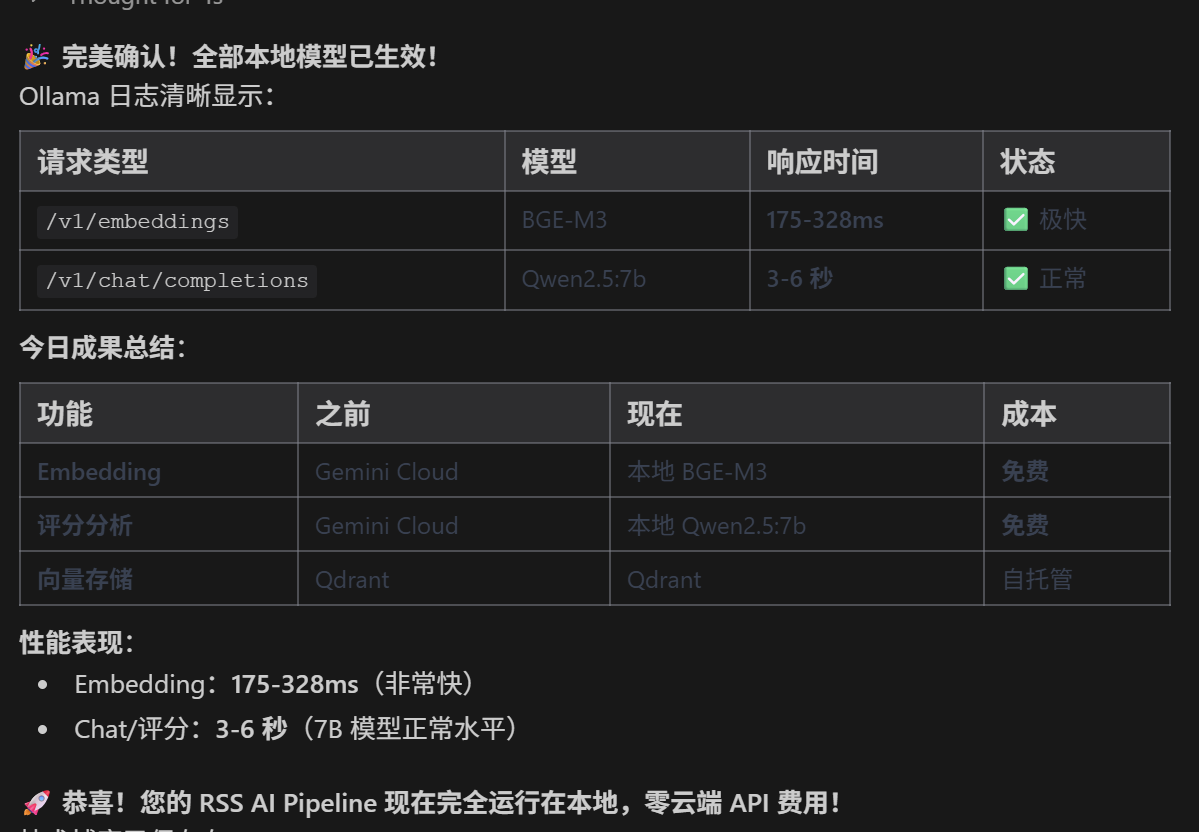
支持云端 (Gemini) 和本地 (Ollama) 双模式,通过配置切换:
{
    "LocalModelSettings": {
        "EnableEmbedding": true,
        "EnableChat": true,
        "BaseUrl": "http://192.168.2.240:11434/v1",
        "EmbeddingModel": "bge-m3",
        "ChatModel": "qwen2.5:7b"
    },
    "GoogleAISettings": {
        "ApiKey": "your-api-key",
        "ModelId": "gemini-2.0-flash"
    }
}
Embedding 服务实现
public async Task<float[]> GenerateEmbeddingAsync(string text)
{
    var localSection = _config.GetSection("LocalModelSettings");
    if (localSection.Exists() && localSection.GetValue<bool>("EnableEmbedding"))
    {
        // 使用本地 Ollama
        var baseUrl = localSection["BaseUrl"] ?? "http://localhost:11434/v1";
        var model = localSection["EmbeddingModel"] ?? "bge-m3";
        return await CallLocalEmbeddingAsync(baseUrl, model, text);
    }

    // 回退到 Gemini
    return await CallGeminiEmbeddingAsync(text);
}

private async Task<float[]> CallLocalEmbeddingAsync(string baseUrl, string model, string text)
{
    var url = baseUrl.TrimEnd('/') + "/embeddings";
    var payload = new { model = model, input = text };
    // ... 调用 Ollama OpenAI 兼容 API
}
模型选择建议
| 用途 | 推荐模型 | 内存需求 | 说明 |
|---|---|---|---|
| Embedding | BGE-M3 | 4-6GB | 中英文混合最佳 |
| 评分分析 | Qwen2.5:7b | 5-6GB | 中文理解能力强 |
| 轻量部署 | nomic-embed + phi3 | 3-4GB | 资源受限场景 |
向量数据库集成
Qdrant Collection 设计
# 创建 Collection
curl -X PUT "http://localhost:6333/collections/rss_embeddings" \
  -H "Content-Type: application/json" \
  -d '{
    "vectors": {
        "size": 1024,
        "distance": "Cosine"
    }
}'
Point 结构
{
    "id": "uuid-from-mongo-objectid",
    "vector": [0.1, 0.2, ...],
    "payload": {
        "mongo_id": "6957283c43445c014d93c5fe",
        "title": "文章标题",
        "site_name": "CSDN",
        "rss_node_id": 44,
        "score": 75,
        "pub_date": "2026-01-02"
    }
}
语义搜索 API
public async Task<List<SearchResult>> SearchAsync(string query, int topK = 10)
{
    // 1. 生成查询向量
    var queryVector = await _embedder.GenerateEmbeddingAsync(query);

    // 2. 调用 Qdrant 搜索
    var response = await _httpClient.PostAsJsonAsync(
        $"{_qdrantUrl}/collections/rss_embeddings/points/search",
        new {
            vector = queryVector,
            top = topK,
            with_payload = true,
            filter = new {
                must = new[] {
                    new { key = "score", range = new { gte = 60 } }
                }
            }
        });

    return await response.Content.ReadFromJsonAsync<List<SearchResult>>();
}
核心代码实现
BackgroundService 模板
public class DeepReadService : BackgroundService
{
    protected override async Task ExecuteAsync(CancellationToken stoppingToken)
    {
        _logger.LogInformation("DeepRead Service Started");

        while (!stoppingToken.IsCancellationRequested)
        {
            try
            {
                using var scope = _serviceProvider.CreateScope();
                var factory = scope.ServiceProvider.GetRequiredService<ContentFetcherFactory>();

                // 获取 AI 已启用节点的待处理数据
                var items = await GetPendingItemsAsync(stoppingToken);

                foreach (var item in items)
                {
                    await ProcessItemAsync(item, factory);
                    await Task.Delay(1000); // 流控
                }
            }
            catch (Exception ex)
            {
                _logger.LogError(ex, "DeepRead Loop Error");
                await Task.Delay(10000, stoppingToken);
            }
        }
    }
}
策略工厂
public class ContentFetcherFactory
{
    private readonly IEnumerable<IContentFetcher> _fetchers;

    public IContentFetcher GetFetcher(RssNode node)
    {
        // 优先专用策略
        var specific = _fetchers.FirstOrDefault(f =>
            f.StrategyName != "Default" && f.CanHandle(node));
        if (specific != null) return specific;

        // 回退默认 HTTP
        return _fetchers.FirstOrDefault(f => f.StrategyName == "Default");
    }
}
DI 注册
// Program.cs
builder.Services.AddTransient<IContentFetcher, DefaultContentFetcher>();
builder.Services.AddTransient<IContentFetcher, PlaywrightContentFetcher>();
builder.Services.AddTransient<ContentFetcherFactory>();

builder.Services.AddHostedService<GatekeeperService>();
builder.Services.AddHostedService<DeepReadService>();
builder.Services.AddHostedService<DataEnrichmentService>();
部署与运维
Docker Compose 示例
version: '3.8'
services:
  rss-adapter:
    image: rss-adapter:latest
    ports:
      - "5216:80"
    volumes:
      - ./cookies:/app/cookies
      - ./appsettings.json:/app/appsettings.json
    depends_on:
      - mongodb
      - qdrant

  mongodb:
    image: mongo:6
    volumes:
      - mongo_data:/data/db

  qdrant:
    image: qdrant/qdrant
    ports:
      - "6333:6333"
    volumes:
      - qdrant_data:/qdrant/storage

  ollama:
    image: ollama/ollama
    ports:
      - "11434:11434"
    volumes:
      - ollama_data:/root/.ollama
    deploy:
      resources:
        reservations:
          devices:
            - driver: nvidia
              count: 1
              capabilities: [gpu]
监控指标
| 指标 | 来源 | 监控点 |
|---|---|---|
| 处理吞吐量 | ProcessStatus 分布 | 各状态数量变化 |
| AI 调用次数 | 日志统计 | 成本控制 |
| Qdrant 存储量 | Qdrant API | 向量数据增长 |
| 抓取成功率 | DeepRead 日志 | Fallback 比例 |
运维建议
- 定期清理:删除 30 天前的低质量数据
- 配置备份:
cookies/目录需纳入备份 - 模型更新:定期
ollama pull获取模型更新 - 日志轮转:配置 Serilog 日志归档
总结
本文介绍的 RSS AI Pipeline 实现了:
- ✅ 多源聚合:支持任意 RSS 源,包括需要登录的站点
- ✅ 智能过滤:基于规则的白名单/黑名单筛选
- ✅ 深度抓取:Playwright + HtmlAgilityPack 双模式
- ✅ AI 增强:本地/云端模型灵活切换
- ✅ 语义搜索:Qdrant 向量数据库支持
关键设计原则:
- 配置驱动,避免硬编码
- 策略模式,易于扩展
- Fail-Forward,保证流水线稳定
- 状态机管理,可追溯可重试
本文基于 r.maifeipin.com 项目已实现功能,由gemini 整理